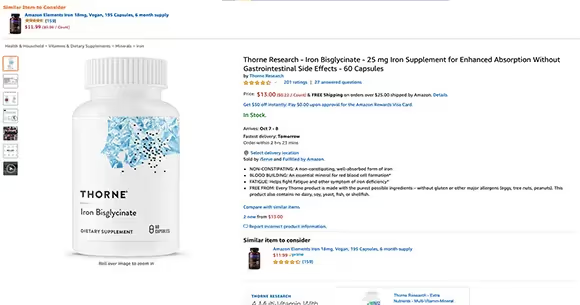
Optimizing an Amazon Product Page to Actually Convert, Not Just Look Nice
Every visitor to your product page cost you something — an ad click, an organic ranking you fought for, an external campaign. If the page doesn't convert, you paid for all of that and got nothing. Conversion rate is the lever that multiplies everything else: improve it and your ad spend goes further, your organic rank improves (because Amazon rewards listings that convert), and your margin breathes. Most sellers obsess over driving more traffic while ignoring the page that traffic lands on. The smarter move is to treat the listing as a conversion machine and ask, element by element, whether each piece is doing its job — in the order a shopper actually experiences it.
The main image earns the click before anything else
Before the product page even loads, your main image is competing in the search grid. It's the single highest-leverage element you own, because it decides whether anyone clicks at all. It must be crisp, fill the frame, show the product clearly on a clean background per Amazon's rules, and be instantly readable as a thumbnail on a phone. If your main image blends into the row of competitors, nothing downstream matters — fix it first.
Read the page as a sequence of jobs
Once a shopper is on the page, their eye and attention move in a rough order. Each element below has one job. If it isn't doing it, that's where you're leaking conversions.
- Title — communicate exactly what this is, the key qualifier (size, count, variant), and why it's relevant, without keyword-stuffing into nonsense.
- Image gallery — show scale, every angle, the product in use, and a clear infographic image that states the top benefits visually.
- Price and Buy Box area — be competitive and in stock; a suppressed Buy Box or 'currently unavailable' kills conversion no matter how good the rest is.
- Bullet points — lead each with the benefit, back it with the feature; answer the 'will this work for me?' questions in order of importance.
- Reviews — enough volume and a healthy rating to make the listing trustworthy; this is often the make-or-break trust signal.
- A+ content — close remaining objections lower down with comparison charts, lifestyle imagery, and detail the bullets couldn't fit.
Write to objections, not to features
The biggest copy mistake is listing features the shopper has to translate into benefits themselves. Flip it: figure out the questions and worries that stop a purchase — Will it fit? Is it durable? Will it work with what I own? Is it worth the price over the cheaper option? — and answer each one directly in your images, bullets, and A+ content. The most persuasive listing isn't the one with the most features; it's the one that removes the most reasons to hesitate. Read your own page as a skeptical shopper and find the question it leaves unanswered.
Make it work on a phone first
Most Amazon shoppers are on mobile, where the experience is brutally compressed: only the first bullets show before a tap, A+ content gets reordered, and tiny text is unreadable. Design for that reality. Front-load your most important bullet, make sure your infographic image carries the core benefits because it may be all a mobile shopper sees, and check your actual listing on a phone rather than admiring it on a desktop. A page that converts beautifully on a 27-inch monitor and falls apart on a phone is converting for almost no one.
Test one change at a time
Conversion optimization is iterative, and you can't learn anything if you change six things at once. Change one element — the main image, the lead bullet, the first A+ module — give it enough traffic to read a real signal, and watch your unit session percentage. Brand-registered sellers can use Amazon's experiment tools to A/B test certain content formally. The discipline matters: a listing improved through measured, one-at-a-time changes compounds, while a listing rewritten wholesale on a hunch just trades one set of unknowns for another.
See which listings deserve your conversion-optimization effort first.
Explore UPC MetricsFrequently asked questions
What's a good conversion rate on Amazon?
It varies widely by category and price point, so there's no single benchmark worth quoting. The more useful comparison is your own listing over time and against your close competitors. If your unit session percentage is rising as you improve the page, you're winning — chasing someone else's published number can mislead you.
Should I improve the listing or buy more traffic first?
Improve the listing first when conversion is weak. Buying more traffic to a page that doesn't convert just multiplies waste. Once the page converts well, additional traffic compounds instead of leaking — and your ad efficiency improves at the same time.
Does conversion rate affect my organic ranking?
Yes. Amazon's algorithm favors listings that turn clicks into sales, so a higher conversion rate tends to lift organic rank, which brings more traffic, which compounds. That feedback loop is exactly why optimizing the page often beats simply spending more on ads.